Tuesday, 27 May 2014

Invoke a Web Service From A Java Class Using Jdev Web Service Proxy

We described how to create a Web service from java code, deploy and test the same in the previous post.

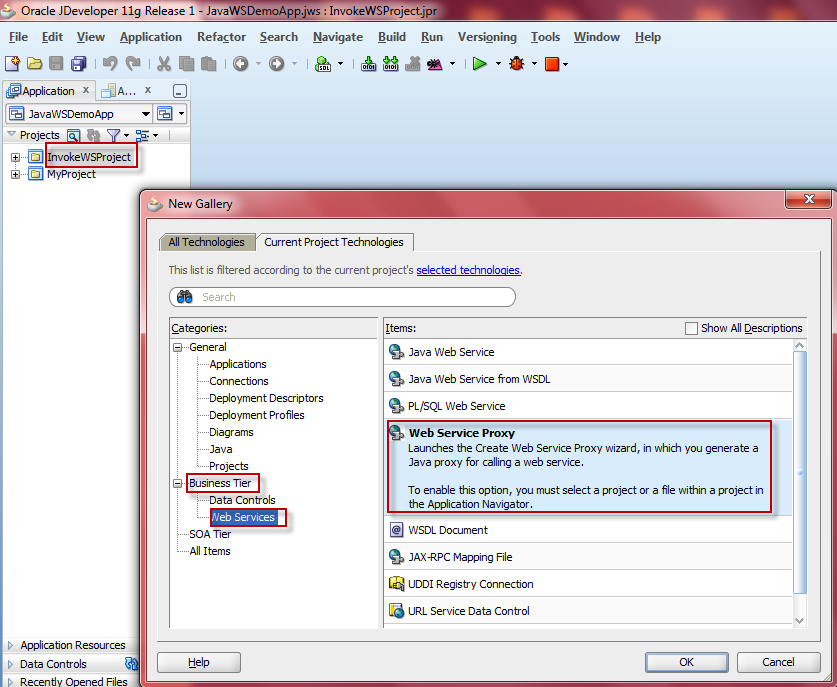
Using the same WSDL file now we are going to invoke the web service in Java program. In Jdevloper there is an option called 'Web Service Proxy' which we can use to invoke the web service. Follow the below steps to do the same.


  • Create a generic project with web services option.


  • After creating the project right click on it and choose new. On this choose Business Tier -> Web service -> Web Service Proxy. .


  • It will open a Wizard go next then give the web service WSDL url.


  • Give the package name for generating files.


  • Go to next till finish the wizard.
  • It generates all the files. We need to put our custom code into the implemented client file as given below.


  • Now change the code as given below. 


  • Build and right click on the file and click on  run . It will give the output on the log window.


Give your comments on this post. Happy Coding :)


Monday, 26 May 2014

Create A Web Service From A Java Method In Jdeveloper

Below example describes how to expose a java method as a Web service.


  • Step1 : Create a generic application as 'JavaDemoApp' in Jdev. Create a generic project as 'MyProject' with webservices include.


  • Right click on the Myproject and add new -> select a java class. Give class name as Greetings.


  • Create a method as 'getGreetings' inside the class which returns a String as output. Save and build the project.
package myproject;
public class Greetings {
    public Greetings() {
        super();
    }
    public String getGreetings(String s)
    {return "Welcome "+s;}
}

  • Now right click on MyProjects and select the BusinessTier->Web services->JavaWeb Service.


  • Go next to wizard as shown in below snaps.


  • Give the component name, service name and serice port.


  • Click next choose SOAP 1.1 binding. then next check the getGreetings method.


  • Go next in the wizard until you get finish button. Now save the project and rebuild it.
  • Now right click on the project and click on deploy. In the deployment wizard go next and on server page choose the weblogic admin server. Go to next till finish the deployment wizard.


  • Now the Web service deployed to weblogic server. For testing login to the weblogic console with url http://localhost:7001/console.
  • Goto deployment tab.Choose the JavaWSDemoApp-MyProject-context-root web application. Expand it you will get the GreetingService web service.


  • Click on the GreetingsSerice it will navigate to separate page. Select Testing tab from the menu.


  • In the Test Point column Test client redirect to testing the web serice page. ?wsdl redirect to the wsdl of the web service.
  • Click on test client it will redirect to the below page. Give your input and click on getGritings button.


  • Below is the response got from the web service invocation.


Give your comments on this post. Happy Coding :)

Invoke A Java Method From A Pl/Sql Function

The below steps describes how to Invoke a Java method from Pl/Sql Function.

  • Step 1 : Create the java method as a static method in the class.

Create the following java file as CallJavaDemo.java 
public class CallJavaDemo {    public static String greetings(String s)    {  return "Hello  "+s;}}

  • Step 2 : Move the Java file to a any location on the oracle database server.
Login to the Oracle database server using 'oracle' user from any FTP s/w. Transfer the java file to any location for example /home/oracle.
  • Step 3 : Compile the Java file using  'javac' command.
Login to the Oracle database server using 'oracle' user from any putty s/w. Execute the below commands to compile the java file. It will generate CallJavaDemo.class file. 
cd /home/oracle
javac  CallJavaDemo.java
  • Step 4 : Load the class file into oracle database server using 'loadjava' utility.
Run the below command using the connection string of the Oracle database.
loadjava -resolve -user username/password@localhost:1521:SID CallJavaDemo.class
  • Step 5 : Create a plsql function with mapping to the loaded java class method. Here the plsql function should have same signature as of the java method.
create or replaceFUNCTION greetings( a in varchar2) RETURN VARCHAR2 AS    LANGUAGE JAVA NAME 'CallJavaDemo.greetings(java.lang.String) return java.lang.String';

  • Step 6 : Test the plsql function. 


Give your feedback on this post. Happy Coding :) 

PO Re-approval API Script: Oracle EBS R12

Oracle has provided a standard API to re approve Purchase Order (PO). Below mentioned is the standard script to re approve PO.

SET serveroutput ON
DECLARE
  l_conterms_exist_flag           po.po_headers_all.conterms_exist_flag%TYPE;
  l_revision_num                      NUMBER;
  l_request_id                           NUMBER := 0;
  l_doc_type                             VARCHAR2(30);
  l_doc_subtype                      VARCHAR2(30);
  l_comm_doc_type                VARCHAR2(30);
  l_document_id                      NUMBER;
  l_agent_id                              NUMBER;
  l_printflag                              VARCHAR2(1) := 'N';
  l_faxflag                                 VARCHAR2(1) := 'N';
  l_faxnum                                VARCHAR2(30);
  l_emailflag                             VARCHAR2(1) := 'N';
  l_emailaddress                     apps.po_vendor_sites.email_address%TYPE;
  l_default_method                apps.po_vendor_sites.supplier_notif_method%TYPE;
  l_user_id                               apps.po_lines.last_updated_by%TYPE    := -1;
  l_login_id                             apps.po_lines.last_update_login%TYPE := -1;
  x_return_status                   VARCHAR2(1);
  x_msg_data                          VARCHAR2(2000);
  l_doc_num                           VARCHAR2(30);
  l_approval_path_id            NUMBER;
  l_progress                           NUMBER;
  v_po_header_id                 NUMBER;
  v_error_flag                        NUMBER:=0;
  v_main_error                      VARCHAR2(1000);

BEGIN
  BEGIN
    SELECT po_header_id INTO v_po_header_id
    FROM apps.po_headers_all
    WHERE segment1='1234' AND org_id=204;
   exception WHEN no_data_found THEN
    v_error_flag:=1;
    v_main_error:=v_main_error||'PO does not exist in EBS';
  END;

IF v_error_flag <> 1 THEN
      l_document_id :=v_po_header_id;
     --------INITIALIZING APPS ENVIRONMENT-------------------------------                
           
      apps.mo_global.init ('PO');
      apps.mo_global.set_policy_context ('S',204);
      apps.fnd_global.apps_initialize ( user_id => 1318, resp_id => 50578, resp_appl_id => 201 );
      apps.po_moac_utils_pvt.set_org_context(204);

-- Set the FND profile option values.
    apps.fnd_profile.put('AFLOG_ENABLED','Y');
    apps.fnd_profile.put('AFLOG_MODULE','%');
    apps.fnd_profile.put('AFLOG_LEVEL',to_char(1));
    apps.fnd_profile.put('AFLOG_FILENAME','');

    -- Refresh the FND cache.
    apps.fnd_log_repository.init();

--Get User ID and Login ID
    l_user_id := apps.fnd_global.user_id;
    l_login_id := apps.fnd_global.login_id;

  BEGIN

    SELECT  nvl(conterms_exist_flag,'N'),
            revision_num,
            decode(type_lookup_code,'BLANKET','PA','CONTRACT','PA','PO'),
            type_lookup_code,
            agent_id
    INTO    l_conterms_exist_flag,
            l_revision_num,
            l_doc_type,
            l_doc_subtype,
            l_agent_id
    FROM    apps.po_headers_all
    WHERE   po_header_id = l_document_id;

      l_comm_doc_type :=  l_doc_subtype;

    exception
      WHEN no_data_found THEN 
        SELECT  nvl(poh.conterms_exist_flag,'N'),            
                por.revision_num,
                'RELEASE',
                poh.type_lookup_code,
                por.agent_id
        INTO    l_conterms_exist_flag,            
                l_revision_num,
                l_doc_type,
                l_doc_subtype,
                l_agent_id
        FROM    apps.po_releases_all por,
                apps.po_headers_all poh
        WHERE   po_release_id = l_document_id
                AND poh.po_header_id=por.po_header_id;

       l_comm_doc_type :=l_doc_type;
      WHEN others THEN
       dbms_output.put_line('IN EXCEPTION sqlcode: '||sqlcode||'sqlerrm: '||sqlerrm);
    END;
    
    SELECT podt.default_approval_path_id
    INTO   l_approval_path_id
    FROM   apps.po_document_types podt
    WHERE  podt.document_type_code   = l_doc_type
           AND podt.document_subtype = l_doc_subtype;

    SELECT MAX(log_sequence) INTO l_progress FROM apps.fnd_log_messages;

    apps.po_document_action_pvt.do_approve(
        p_document_id => l_document_id,
        p_document_type => l_doc_type,
        p_document_subtype => l_doc_subtype,
        p_note => NULL,
        p_approval_path_id => l_approval_path_id,
        x_return_status => x_return_status,
        x_exception_msg => x_msg_data );

     SELECT MAX(log_sequence) INTO l_progress FROM apps.fnd_log_messages;
IF x_return_status ='S' THEN
 
        -- Communicate to the Supplier
      apps.po_vendor_sites_sv.get_transmission_defaults (  
        p_document_id      => l_document_id,  
        p_document_type    => l_doc_type,  
        p_document_subtype => l_doc_subtype,  
        p_preparer_id      => l_agent_id,  
        x_default_method   => l_default_method,  
        x_email_address    => l_emailaddress,  
        x_fax_number       => l_faxnum,  
        x_document_num     => l_doc_num,       
        p_retrieve_only_flag => 'Y'  
        );
 
      IF (l_default_method  = 'EMAIL') AND (l_emailaddress IS NOT NULL) THEN  
     l_faxnum := NULL;  
   elsif (l_default_method  = 'FAX') AND (l_faxnum IS NOT NULL) THEN  
        l_emailaddress := NULL;  
      elsif (l_default_method  = 'PRINT') THEN  
        l_emailaddress := NULL;  
        l_faxnum := NULL;  
      ELSE
        l_default_method := 'PRINT'; 
        l_emailaddress := NULL;  
        l_faxnum := NULL;  
      END IF; 
    
      apps.po_communication_pvt.communicate(
        p_authorization_status=>apps.po_document_action_pvt.g_doc_status_approved,
        p_with_terms=>l_conterms_exist_flag,
        p_language_code=>apps.fnd_global.current_language,
        p_mode =>l_default_method,
        p_document_id =>l_document_id,
        p_revision_number =>l_revision_num,
        p_document_type =>l_comm_doc_type,
        p_fax_number =>l_faxnum,
        p_email_address =>l_emailaddress,
        p_request_id =>l_request_id);

SELECT MAX(log_sequence) INTO l_progress FROM apps.fnd_log_messages;
    apps.fnd_file.put_line(apps.fnd_file.LOG,' LOG SEQUENCE '||l_progress);
    END IF;
 COMMIT;
ELSE
  dbms_output.put_line('Error'||v_main_error);
END IF;
exception
WHEN others THEN
SELECT MAX(log_sequence) INTO l_progress FROM apps.fnd_log_messages;
   apps.fnd_file.put_line(apps.fnd_file.LOG,' LOG SEQUENCE '||l_progress);
END;  

Blanket Purchase Order Import Program Script: Oracle EBS R12

To create Blanket Purchase Order(PO) using Oracle standard API please follow below steps.

Step:1 Validate and Insert PO header and line details in PO_HEADERS_INTERFACE and PO_LINES_INTERFACE tables respectively.

SET serveroutput ON
DECLARE
p_supplier VARCHAR2(1000):='Staples';
p_supplier_site VARCHAR2(1000):='STAPLES LA';
p_ship_to_location VARCHAR2(1000):='V1- New York City';
p_bill_to_location VARCHAR2(1000):='V1- New York City';
p_currency VARCHAR2(1000):='USD';
p_buyer VARCHAR2(1000):='Stock, Ms. Pat';
p_item VARCHAR2(1000):='Oil';
p_unit_of_measure VARCHAR2(1000):='METRICTON';
p_unit_price number:=1;
v_org_name       VARCHAR2(30)                               := 'Vision Operations';
v_dest_code      VARCHAR2(30)                               := 'INVENTORY';
v_error_flag NUMBER:= 0;
v_main_error VARCHAR2(1000):= NULL;
v_currency VARCHAR2(1000);
v_agent_id number;
v_org_id NUMBER;
v_vendor_id NUMBER;
v_vendor_site_id NUMBER;
v_ship_to_location_id NUMBER;
v_bill_to_location_id NUMBER;
v_item_id NUMBER;
v_uom_code VARCHAR2(1000);
v_intf_dist_id NUMBER;
v_intf_line_id NUMBER;
v_intf_header_id NUMBER;
v_batch_id NUMBER;
v_line_type_id NUMBER;

BEGIN
  -----------VALIDATING THE PRICE CURRENCY CODE --------------
  BEGIN
    SELECT currency_code
    into v_currency
    FROM apps.fnd_currencies
    WHERE enabled_flag       = 'Y'
    AND currency_flag        = 'Y'
    AND upper(currency_code) = upper(trim(p_currency));
  EXCEPTION
  WHEN no_data_found THEN
    v_error_flag := 1;
    v_main_error := v_main_error||'PRICE CURRENCY NOT EXIST IN EBS (WHEN ND) ';
  WHEN OTHERS THEN
    v_error_flag := 1;
    v_main_error := v_main_error||' ERROR WHILE VALIDATING CURRENCY CODE(WHEN OTH) '||' '||SQLCODE||':'||sqlerrm ;
  END;
   --------- --VALIDATING AGENT AND FETCHING THE AGENT_ID-------------------------
  BEGIN
    SELECT ppf.person_id
    INTO v_agent_id
    FROM per_people_f ppf
    WHERE ppf.full_name = p_buyer
    and rownum=1;
  EXCEPTION
  WHEN no_data_found THEN
    v_error_flag := 1;
    v_main_error := v_main_error||'AGENT ID/TRADER PERSON NUMBER NOT EXIST IN EBS(WHEN ND) ';
  WHEN OTHERS THEN
    v_error_flag := 1;
    v_main_error := v_main_error|| 'ERROR WHILE VALIDATING AGENT ID / TRADER PERSON NUMBER(WHEN OTH)-'|| SQLCODE ||':'||sqlerrm;
  END;
  ---------VALIDATING ORAGANIZATION AND FETCHING  ORANIZATION ID-----------------
  BEGIN
    SELECT  organization_id
    INTO v_org_id
    FROM apps.hr_operating_units
    WHERE NAME = v_org_name
    and rownum=1;
  EXCEPTION
  WHEN no_data_found THEN
    v_error_flag := 1;
    v_main_error := v_main_error||'ORGANIZATION ID/INTERNAL COMPANY NUMBER NOT FOUND IN EBS(WHEN ND) '||v_org_name;
  WHEN OTHERS THEN
    v_error_flag := 1;
    v_main_error := v_main_error||' ERROR WHILE VALIDATING ORGANIZATION ID/INTERNAL COMPANY NUMBER (WHEN OTH)-'||v_org_name||' '||SQLCODE||' '|| sqlerrm;
  END;
  ---------------------VALIDATING THE VENDOR NAME AND FETCHING VENDOR_ID----------------------
  BEGIN
    SELECT vendor_id
    INTO v_vendor_id
    FROM apps.po_vendors
    WHERE upper(vendor_name) = upper(p_supplier);
  EXCEPTION
  WHEN no_data_found THEN
    v_error_flag := 1;
    v_main_error := v_main_error||'VENDOR ID/COUNTERPART COMPANY NUMBER NOT EXISTS IN EBS (WHEN ND) '||p_supplier;
  WHEN OTHERS THEN
    v_error_flag := 1;
    v_main_error := v_main_error||' ERROR WHILE VALIDATING VENDOR ID/COUNTERPART COMPANY NUMBER (WHEN OTH) '||p_supplier||' '||SQLCODE||' '||sqlerrm;
  END;
  ---------------------VALIDATING THE VENDOR SITE ID----------------------------
  BEGIN
    SELECT vendor_site_id
    INTO v_vendor_site_id
    FROM apps.po_vendor_sites_all
    WHERE upper(vendor_site_code) = upper(p_supplier_site)
    AND vendor_id                 = v_vendor_id
    AND org_id                    = v_org_id;
  EXCEPTION
  WHEN no_data_found THEN
    v_error_flag := 1;
    v_main_error := v_main_error||'VENDOR SITE ID NOT EXIST IN EBS (WHEN ND) '||p_supplier_site;
  WHEN OTHERS THEN
    v_error_flag := 1;
    v_main_error := v_main_error||' ERROR WHILE VALIDATING VENDOR SITE ID(WHEN OTH)-'||p_supplier_site||' '||SQLCODE||':'|| sqlerrm;
  END;
  --------VALIDATING THE SHIP TO LOCATION AND FETCHING SHIP_TO_LOCATION_ID-------------
  BEGIN
    SELECT location_id
    INTO v_ship_to_location_id
    FROM hr_locations_all
    WHERE location_code = p_ship_to_location;
  EXCEPTION
  WHEN no_data_found THEN
    v_error_flag := 1;
    v_main_error := v_main_error||'SHIP TO LOCATION ID/DESTINATION LOCATION NUMBER NOT FOUND IN EBS (WHEN ND)-'||p_ship_to_location;
  WHEN OTHERS THEN
    v_error_flag := 1;
    v_main_error := v_main_error||'ERROR WHILE VALIDATING SHIP TO LOCATION ID/DESTINATION LOCATION NUMBER (WHEN OTH)'||p_ship_to_location||' '||SQLCODE||':'||sqlerrm;
  END;
  -------------------VALIDATING THE BILL TO LOCATION AND FETCHING THE BILL_TO_LOCATION_ID--------------------------
  BEGIN
    SELECT location_id
    INTO v_bill_to_location_id
    FROM hr_locations_all
    WHERE location_code = p_bill_to_location ;
  EXCEPTION
  WHEN no_data_found THEN
    v_error_flag := 1;
    v_main_error := v_main_error||' BILL TO LOCATION ID NOT EXISTS IN EBS (WHEN ND) '||p_bill_to_location;
  WHEN OTHERS THEN
    v_error_flag := 1;
    v_main_error := v_main_error||' ERROR WHILE VALIDATING BILL TO LOCATION ID(WHEN OTH) '||p_bill_to_location||':'||SQLCODE||':'||sqlerrm;
  END;
  ----------------VALIDATING THE ITEM AND FETCHING ITEM ID----------------------
  BEGIN
    SELECT inventory_item_id
    INTO v_item_id
    FROM apps.mtl_system_items
    WHERE enabled_flag  = 'Y'
    AND SYSDATE         > TRUNC(NVL(start_date_active, SYSDATE -1))
    AND SYSDATE         < TRUNC(NVL(end_date_active, SYSDATE   + 1))
    AND segment1        = p_item
    AND organization_id = v_org_id;
  EXCEPTION
  WHEN no_data_found THEN
    v_error_flag := 1;
    v_main_error := v_main_error||'ITEM ID/COMODITY NOT FOUND IN EBS PLEASE CHECK FOR REFERENCE DATA MAPPING FOR TRADE ';
  WHEN OTHERS THEN
    v_error_flag := 1;
    v_main_error := v_main_error||'ERROR WHILE VALIDATING ITEM ID/COMODITY FOR TRADE '||p_item||' '||SQLCODE||' '||sqlerrm;
  END;
  ------------------- VALIDATE UNIT_PRICE---------------------
  BEGIN
    IF(NVL(p_unit_price,0) < 1) THEN
      v_error_flag        := 1;
      v_main_error        := v_main_error||' UNIT_PRICE CANNOT BE LESS THAN ZERO OR NULL FOR OBLIGATION ';
    END IF;
  END;
  -------------- VALIDATE UNIT_OF_MEASURE------------------------
  BEGIN
    SELECT uom_code
    INTO v_uom_code
    FROM apps.mtl_units_of_measure
    WHERE SYSDATE              < TRUNC(NVL(disable_date, SYSDATE + 1))
    AND upper(unit_of_measure) = upper(p_unit_of_measure);
  EXCEPTION
  WHEN no_data_found THEN
    v_error_flag := 1;
    v_main_error := v_main_error||'NO UOM FOUND IN EBS FOR UOM CODE '||p_unit_of_measure;
  WHEN too_many_rows THEN
    v_error_flag := 1;
    v_main_error := v_main_error||'MULTIPLE UOM CODE FOUND IN EBS FOR UOM '||p_unit_of_measure;
  WHEN OTHERS THEN
    v_error_flag := 1;
    v_main_error := v_main_error||' ERROR WHILE FETCHING UOM CODE '||p_unit_of_measure||':'||SQLCODE||':'||sqlerrm;
  END;
  ------------ GETTING SEQUESNCE VALUE FOR INTERFACE HEADER ID --------
  SELECT apps.po_headers_interface_s.nextval
  INTO v_intf_header_id
  FROM dual;
  -----------GENERATING BATCH ID--------------------
  SELECT TO_CHAR(SYSDATE,'DDMMYYHHMMSS')
  INTO v_batch_id
  FROM dual;
  ------GETTING INTERFACE LINE ID FROM LINE INTERFACE SEQUENCE----------------
  BEGIN
    SELECT apps.po_lines_interface_s.nextval INTO v_intf_line_id FROM dual;
  EXCEPTION
  WHEN no_data_found THEN
    v_error_flag := 1;
    v_main_error := v_main_error||' Error In Getting Value From Sequence For Line Id ';
  WHEN OTHERS THEN
    v_error_flag := 1;
    v_main_error := v_main_error||' Error In Getting Value From Sequence For Line Id '||SQLCODE||':'||sqlerrm;
  END;
  -------------Getting Line Type Id for CM line Type --------------
  BEGIN
    SELECT line_type_id
    INTO v_line_type_id
    FROM apps.po_line_types_v
    WHERE NVL(inactive_date,SYSDATE+1) > SYSDATE
    AND line_type                      = 'Goods';
  EXCEPTION
  WHEN no_data_found THEN
    v_error_flag := 1;
    v_main_error := 'ERROR WHILE FETCHING LINE TYPE ID(WHEN ND)-';
  WHEN OTHERS THEN
    v_error_flag := 1;
    v_error_flag := v_error_flag||' ERROR WHILE FETCHING LINE TYPE ID(WHEN OTH) '||SQLCODE||':'||sqlerrm;
  END;
  ----------- GETTING INTERFACE DISTRIBTION ID FROM DISTRIBUTION INTERFACE SEQUENCE ----------------
  BEGIN
    SELECT apps.po_distributions_interface_s.nextval
    INTO v_intf_dist_id
    FROM dual;
  EXCEPTION
  WHEN no_data_found THEN
    v_error_flag := 1;
    v_main_error := v_main_error||' ERROR IN GETTING VALUE FROM SEQUENCE FOR DISTRIBUTION ID ';
  WHEN OTHERS THEN
    v_error_flag := 1;
    v_main_error := v_main_error||'ERROR IN GETTING VALUE FROM SEQUENCE FOR DISTRIBUTION ID '||SQLCODE||':'||sqlerrm;
  END;
dbms_output.put_line(v_main_error);
  --===========================Inserting Records IN Interface Table ==================================-----------------
  IF v_error_flag <> 1 THEN
    BEGIN
      INSERT
      INTO apps.po_headers_interface
        (
          interface_header_id,
          action,
          process_code,
          document_type_code,
          batch_id,
          document_num,
          currency_code, 
          approval_required_flag,
          approval_status,
          vendor_id,
          terms_id,
          fob,
          org_id,
          agent_id,
          effective_date,
          vendor_site_id,
          ship_to_location_id,
          bill_to_location_id
        )
        VALUES
        (
          v_intf_header_id,       -- INTERFACE_HEADER_ID
          'ORIGINAL',             -- ACTION
          'PENDING' ,             -- PROCESS_CODE
          'BLANKET',              -- DOCUMENT_TYPE_CODE
          v_batch_id,
          NULL,                   -- DOCUMENT_NUM
          v_currency,             -- CURRENCY_CODE
          'Y',                    -- APPROVAL_REQUIRED_FLAG
          'APPROVED',             -- APPROVAL_STATUS
          v_vendor_id,            -- VENDOR_ID
          NULL,                   -- V_PAYEMENT_TERM_ID,          
          NULL,                   -- V_DELIVERY_TERM,              
          v_org_id,               -- ORG_ID
          v_agent_id,             -- AGENT_ID
          to_date(SYSDATE),       -- EFFECTIVE_DATE
          v_vendor_site_id,       -- VENDOR_SITE_ID
          v_ship_to_location_id,  -- SHIP_TO_LOCATION_ID
          v_bill_to_location_id   -- BILL_TO_LOCATION_ID
        );
      IF SQL%notfound THEN
        v_error_flag := 1;
        v_main_error := v_main_error||' '||'Record Not Inserted in Header Interface Table';
      ELSE
        dbms_output.put_line('Inserted Records In Header Interface Table');
      END IF;
      IF v_error_flag <> 1 THEN
        BEGIN
          INSERT
          INTO apps.po_lines_interface
            (
              interface_line_id,
              interface_header_id,
              line_num,
              uom_code,
              item_id,
              unit_price,
              need_by_date,
              promised_date,
              line_type_id,
              ship_to_organization_id,
              ship_to_location,
              note_to_receiver
            )
            VALUES
            (
              v_intf_line_id,         --INTERFACE_LINE_ID
              v_intf_header_id,       --INTERFACE_HEADER_ID
              NULL,                   --LINE_NUM
              v_uom_code,             --UNIT_OF_MEASURE
              v_item_id,              --ITEM_ID
              p_unit_price,           --UNIT_PRICE
              SYSDATE,                --NEED_BY_DATE
              SYSDATE,                --PROMISED_DATE
              v_line_type_id,         --LINE_TYPE_ID
              NULL,                   --SHIP_TO_ORGANIZATION_ID
              v_ship_to_location_id,  --SHIP_TO_LOCATION
              NULL                    --NOTE_TO_RECEIVER
            );
          IF SQL%notfound THEN
            v_error_flag := 1;
            v_main_error := v_main_error||' '||'Record Not Inserted in Lines Interface Table';
          ELSE
            dbms_output.put_line('Inserted Records In Lines Interface Table');
          END IF;
       END;
      END IF;
    END;
  END IF;
 commit;
END;

Step:2 Once the records are inserted in PO header and line interface tables run the API Import Price Catalogs(POXPDOI) to import Blanket Purchase Order.

SET serveroutput ON
DECLARE
v_request_id NUMBER;
v_org_id     NUMBER := 204;
BEGIN
  apps.mo_global.init ('PO');
  apps.mo_global.set_policy_context ('S', 204);
  apps.fnd_global.apps_initialize ( user_id => 1318, resp_id => 50578, resp_appl_id => 201 );
  v_request_id :=apps.fnd_request.submit_request 
                                            ('PO' ,
                                            'POXPDOI' ,
                                            'Import Price Catalogs' ,
                                              SYSDATE ,
                                              FALSE ,
                                              NULL ,
                                              'Blanket' ,
                                              NULL ,
                                              'N' ,
                                              'N' ,
                                              'APPROVED' ,
                                              NULL ,
                                              NULL ,
                                              v_org_id,   -- operating unit ID
                                              'N' ,
                                              NULL ,
                                              NULL ,
                                              NULL ,
                                              NULL );
  dbms_output.put_line(v_request_id);
commit;
END;

Step:3 Once concurrent program gets completed you can query the Blanket PO.