Friday, 30 May 2014

Pick Activity to Receive Multiple Response From Asynchronous BPEL Process

There are certain situations where BPEL process component should be capable of receiving multiple response from Asynchronous BPEL process.
Multiple onmessage branch of Pick activity can be used to receive multiple responses from service.

In below example it us described how to use Pick activity to receive multiple response from service.

To demonstrate we will create a BPEL process which invokes a Asynchronous BPEL process that returns two different response based on operation type(input parameter).

  • If operation type is "name" it returns first name
  • If operation type is "fullname" it returns first name and last name
To create this Asynchronous process click here.

Create a asynchronous BPEL process.


Open BPEL.xsd and modify the input elements.


Open the BPEL process ,add Partenerlink and add the wsdl of AsynchNameDemo BPEL process created here.


Add an Invoke activity and connect to this partenerlink.


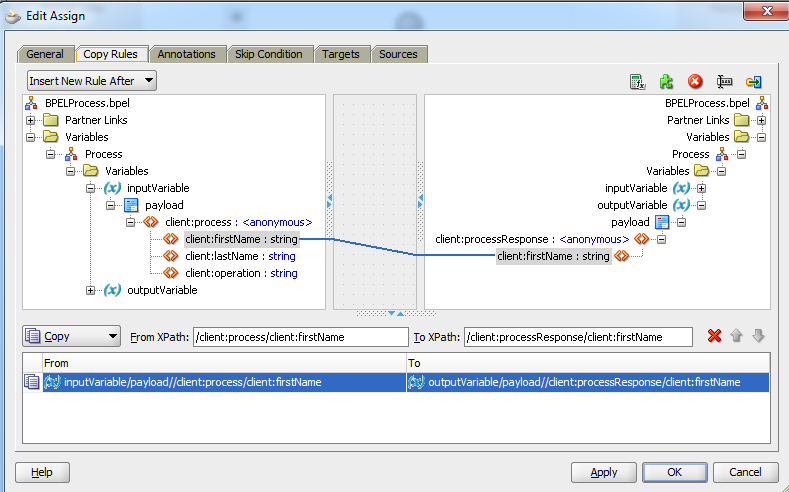
Add an assign activity above this invoke activity and assign input parameter for the AsyncNameService process.


Now add an Pick activity below this Invoke activity. By default there will be a OnMessage branch. By clicking on the activity add one more OnMessage branch.

Click on first OnMessage,select your partnerlink "AsynchNameService" ,select the operation "processResponse" and add the variable too.


Similarly for the second OnMessage branch handle the response from processFullNameResponse.


Add and assign activity for each branch and assign the output variable the response received in respective onmessage response output variables.

Deploy the process and test.
  • For operation as "name"


  • When operation name is "fullname"


Asynchronous BPEL Process Returning Multiple Responses

There are certain scenarios in which an Asynchronous process can have multiple responses.

Lets assume an asynchronous process which accepts input parameters: firstName ,lastName and operations.
If operation is "name" it returns only First Name
If operation is "fullname" it returns  firstName and lastName.

As the returned values in both the cases are different number of items we need to use two different operations.

Create a new composite AsynchNameDemo and select composite with BPEL Process and click on Finish button.


Give the process name as BPELProcess and choose template as Asynchronous BPEL Process.


Open BPELProcess.xsd and edit it for appropriate request and response parameters.


Open BPELProcess.wsdl file to add the appropriate changes.

  • Add a new meesage based on new response element processResponseFullName


  • Add a new operation in the callback porttype.


Now open BPEL process and add a switch activity.In the case branch add the condition that if operation='name' we will return only first name.


Drag and bring the callbakClient inside case branch.Open the callbackClient and make assure that operation selected is processResponse. 


Add as assign activity before this invoke and assign output parameter the first name as output.


Delete the otherwise branch of switch activity and add one for condition branch and add the condition for operation as :"fullname".


Add a invoke activity in this case branch and name it as callbackClientwithFullName. Choose the operation type as processFullNameResponse and add an auto created input variable.


Add an assign activity before this invoke activity and assign appropriate output variables for operation type "fullname".


The complete process now looks like:-


Now deploy the process and test.
  • When input is "name"


  • When operation is "fullname"


Thursday, 29 May 2014

Requisition Import API : Oracle EBS R12

In Oracle EBS R12 we can create Requisition from GUI as well as we can import the Requisition using import program "Requisition Import".

Follow the below steps to import requisition:

Step:1  Validate all the entities and insert in PO_REQUISITIONS_INTERFACE_ALL

INSERT
INTO apps.PO_REQUISITIONS_INTERFACE_ALL
  (
    interface_source_code,
    org_id,
    destination_type_code,
    authorization_status,
    preparer_id,
    charge_account_id,
    source_type_code,
    unit_of_measure,
    line_type_id,
    quantity,
    destination_organization_id,
    deliver_to_location_id,
    deliver_to_requestor_id,
    item_id,
    need_by_date,
    suggested_vendor_name,
    unit_price
  )
  VALUES
  (
    'IMPORT_INV',
    204,                        --(Validate against apps.org_organization_definitions table)
    'INVENTORY',
    'INCOMPLETE',
    25,                         --(Validate against apps.per_all_people_f tabel)
    13185,                   --(Vlidate against apps.mtl_system_items_b corresponding to item and inv org),
    'VENDOR',           --SOURCE_TYPE_CODE,
    'METRICTON',   --UNIT_OF_MEASURE
    1,                           --(Validate against PO_LINE_TYPES)
    100,                       --QUANTITY
    204,                       --DESTINATION_ORGANIZATION_ID,
    27108,                   --DELIVER_TO_LOCATION_ID,
    25,                         --DELIVER_TO_REQUESTOR_ID
    208955,                 --(Validate against mtl_system_items_b)
    SYSDATE,           --NEED_BY_DATE
    'Staples',               --SUGGESTED_VENDOR_NAME
    1                             --UNIT_PRICE
  );

Step:2 Submit "Requisition Import" program.

BEGIN
  APPS.FND_GLOBAL.APPS_INITIALIZE ( USER_ID => 1318, RESP_ID => 50578, RESP_APPL_ID => 201 );
  APPS.FND_REQUEST.SET_ORG_ID('204');
  V_REQUEST_ID := APPS.FND_REQUEST.SUBMIT_REQUEST (APPLICATION => 'PO' --Application,
                                                  ,PROGRAM => 'REQIMPORT'    --Program,
                                                  ,ARGUMENT1 => ''                       --Interface Source code,
                                                  ,ARGUMENT2 => ''                       --Batch ID,
                                                  ,ARGUMENT3 => 'ALL'               --Group By,
                                                  ,ARGUMENT4 => ''                       --Last Req Number,
                                                  ,ARGUMENT5 => 'N'                    --Multi Distributions,
                                                  ,ARGUMENT6 => 'Y'                    --Initiate Approval after ReqImport
                                                  );
  COMMIT;
END;

Query to Check Concurrent Manager Status

Below mentioned is the query to check concurrent manager status in Oracle APPS.

SELECT DECODE(CONCURRENT_QUEUE_NAME,'FNDICM','Internal Manager','FNDCRM','Conflict Resolution Manager','STANDARD','Standard Manager' ) AS "Concurrent Manager's Name",
max_processes  AS "TARGET Processes",
running_processes AS "ACTUAL Processes"
FROM apps.fnd_concurrent_queues
WHERE CONCURRENT_QUEUE_NAME IN ('FNDICM','FNDCRM','STANDARD');


If status of target process and actual process is non-zero then our concurrent manager is up and running.

Update Purchase Order Line Details : Oracle EBS R12

Oracle has provided standard API to update purchase order line details such as;

  • Line Quantity
  • Unit Price
  • Promise Date 
  • Need by Date
Below is the sample script to update PO Line details using API "po_change_api1_s.update_po".


SET serveroutput ON
DECLARE
v_po_number          NUMBER :='52766';
v_po_line_num       NUMBER :=1;
v_quantity               NUMBER :=200;
v_unit_price            NUMBER :=5;
v_promise_date      DATE   :=SYSDATE;
v_need_by_date    DATE   :=SYSDATE;
v_org_id                  NUMBER :=204 ;
v_revision_num     NUMBER;
v_error_flag            NUMBER :=0;
v_error_msg           VARCHAR2(2000);
v_result                   NUMBER;
            
  BEGIN
      --------INITIALIZING APPS ENVIRONMENT-------------------------------                
           
      apps.mo_global.init ('PO');
      apps.mo_global.set_policy_context ('S',204);
      apps.fnd_global.apps_initialize ( user_id => 1318, resp_id => 50578, resp_appl_id => 201 );

           ----GET REVISION NUMBER FROM TABLE-------
                BEGIN
                      SELECT  revision_num
                      INTO v_revision_num
                      FROM apps.po_headers_all
                      WHERE segment1 = '52766';
                exception
                    WHEN no_data_found THEN
                      v_error_flag := 1;
                      v_error_msg:='ERROR IN FETCHING REVISION NUMBER FROM BASE TABLE (ND) ';
                    WHEN others THEN
                      v_error_flag := 1;
                      v_error_msg:='ERROR IN FETCHING REVISION NUMBER FROM BASE TABLE (OTH) '||sqlcode||' '||sqlerrm;
                END;
          IF (v_error_flag <> 1) THEN
          --------CALLING PO UPDATE API--------
          v_result := apps.po_change_api1_s.update_po(x_po_number => v_po_number,
                                                      x_release_number => NULL, 
                                                      x_revision_number => v_revision_num,
                                                      x_line_number => v_po_line_num, 
                                                      x_shipment_number => 1, 
                                                      new_quantity => v_quantity,
                                                      new_price => v_unit_price, 
                                                      new_promised_date => v_promise_date, 
                                                      new_need_by_date => v_need_by_date,
                                                      launch_approvals_flag => 'Y',
                                                      update_source => NULL,
                                                      VERSION => '1.0',
                                                      x_override_date => NULL, 
                                                      x_api_errors => v_api_errors,
                                                      p_buyer_name => NULL,
                                                      p_secondary_quantity => NULL,
                                                      p_preferred_grade => NULL, 
                                                      p_org_id => v_org_id);
            COMMIT;
            IF(v_result = 1) THEN
                  dbms_output.put_line('PO UPDATED SUCCESSFULLY');  
            ELSE
                  dbms_output.put_line('API Failed to Update');
            END IF;
        END IF;
 exception
        WHEN others THEN
           v_error_msg := 'ERROR in updating PO Lines';
 END ;